Showing posts with label Software. Show all posts

Wednesday, April 7, 2010

Free Software You Can't Live Without Vol. 4 - DVD Shrink 3.2

DVD Shrink 3.2

DVD backup is a questionable activity that balances a fine line of legality but for a father with a young son (15 months) and a DVD collection, this software is great.  You see, kids DVD's are expensive and they rarely get marked down unlike most regular DVD movies.  My kid LOVES his Yo Gabba Gabba and Wow Wow Wubzy but when I purchase him a disc, I don't want to worry if he pops open the DVD player and yanks out the disc to play with it.  He also loves to dig through his collection and open the DVD cases.  This creates a problem when you can't afford to just repurchase these expensive shows over and over.  DVD Shrink solves my problem, allowing me to make a quick backup on my computer and then burn a copy on a dirt cheap blank DVD.  If the kid gets to the disc, no sweat because I've got the original in a safe spot ready to be copied again if the need arises.  This is the purpose of this kind of program and I'm very thankful for its existence.  Combine DVD Shrink with ImgBurn and you've got a quick, easy and powerful solution to backing up your personal library.  Unfortunately, the law has forced this program off the market making it hard to get but if you know how to use Google, you can find it quickly and easily.  Just make sure you are downloading DVD Shrink 3.2.0.15 English (2004) which is the latest official version.

Monday, March 29, 2010

Free Software You Can't Live Without Vol. 3 - VLC Media Player

VLC Media Player

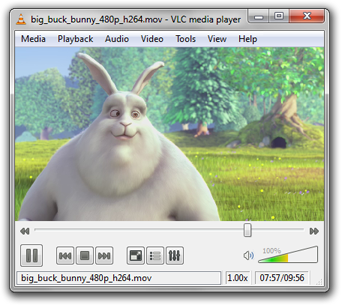
Video formats are a dime a dozen and with video having become such a major part of the computer scene, I'm thrilled to finally be able to throw off the bonds of running multiple video players for my viewing needs.  Having grown up with computers, nothing irritated me more than have to deal with multiple video players to watch videos on my computer.  Granted, with the advent of Youtube and the integration of video and web, this has become less of an issue but when you want to watch video directly from your machine, nothing beats VLC Media Player from VideoLAN.  Quicktime, Windows Media Player and all the other players can go to hell, VLC plays everything and does it better than any of those proprietary players.  Best of all, it's FREE! 

Run over to VideoLAN and download this now and if you like it, please donate to the developer so they can continue to upgrade and expand this wonderful software.

Sunday, March 21, 2010

Free Software You Can't Live Without Vol. 2 - Gimp

Gimp

When you think of professional image editing programs, everyone immediately thinks Photoshop.  It's a great piece of software but it's not very cost effective for the average user.  Lucky for us, the world of Linux has brought us a wonderful alternative that runs on Windows and best of all, it's FREE.  Developed for Linux users as a powerful alternative to Photoshop, Gimp is the image editing software of choice for people on a budget.  Taking things a step further, Gimphoto is a customized version of the original Gimp made to look and act just like Photoshop in order to make the transition easy and painless.  It supports everything from layers to filter effects and can even use a variety of Photoshop plugins if you need them. 

If your looking to make the jump to Linux and want to immerse yourself in software built for the system, check you the original form of Gimp

If your like me and want the power of Gimp in a familiar package, check out the modified version known as GimPhoto

Saturday, March 20, 2010

Free Software You Can't Live Without Vol. 1 - ImgBurn 2.5

ImgBurn 2.5

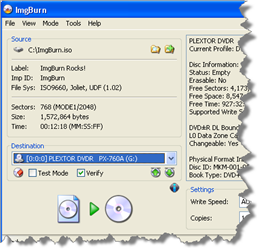
DVD burning has always been a problem for me.  Trying to find a quality burning programs caused me countless headaches and created more coasters than I know what to do with.  After trying almost every commercial level piece of software (Nero sucks big time), I stumbled upon one of the finest and most complete burning programs ever conceived.  ImgBurn allowed me to burn disk images, video discs and even has the ability to burn Blu-Ray Discs which is great for people into that sort of thing.  The software has an impressive list of features for freeware (version 2.5 and earlier).  Recently, the software has gone Adware for version 2.5.1 but it's still a small price to pay for such a powerful piece of software.  I personally reccomend sticking with version 2.5 to avoid the Adware.  It supports every version of Windows and even has Wine support for the Linux fans.

Supported environments: Windows 95, 98, Me, NT4, 2000, XP, 2003, Vista, 2008, 7 and 2008 R2 (including all the 64-bit versions). It also officially supports Wine for Linux.

ImgBurn Official Website:
http://www.imgburn.com/